


Next: 3 EXAMPLES OF MODELS Up: 2 SOFTWARE FOR GLOBAL Previous: 8 JAVA 1.0 Contents Index
 ),
),
 ),
),
 ).
).
GMJ can be run as an applet or as a stand-alone application. One can run applet over the Web. This cannot be done by an application. Security restrictions is the disadvantage of applets. We need security permits to read/write files and to connect third parties (see Section 4.6).
These restrictions are lifted using stand-alone applications.
Using stand-alone applications, the most recent Java features
supported by the Java Development Kit (JDK) can be exploited.
The reason is that web browsers are late adapting new Java
Developer Kits (JDK), as usual. If JDK is installed, then
applets can be loaded directly by
appletviewers![[*]](footnote.png) .
.
The JDK1.2 system provides new facilities as compared with
JDK1.1. For example, Just-in-Time compilers (jitc) increase the speed
several times. The 'policy' files of JDK1.2
exempts trusted users from some security restrictions.
 shows how to set configuration
parameters of the
shows how to set configuration
parameters of the  applet. The
  tag of GMJ1 looks
like this:
tag of GMJ1 looks
like this:

 specifies the applet class and should not be changed.
 specifies the relative URL of the applet class archive
file and user class files. The URL is relative to the location of
the HTML file where the tag resides or is an absolute
path.
specifies the relative URL of the applet class archive
file and user class files. The URL is relative to the location of
the HTML file where the tag resides or is an absolute
path.
 lists the class archive files.
 and
and
 specifies the applet size, as it appears on the HTML
page.
lists tasks which are available
when the applet loads. Complete class names (package and class
name) are separated by
specifies the applet size, as it appears on the HTML
page.
lists tasks which are available
when the applet loads. Complete class names (package and class
name) are separated by  symbol.
lists methods which are supported when the applet loads.
lists visual analysis classes which are
supported when the applet loads.
symbol.
lists methods which are supported when the applet loads.
lists visual analysis classes which are
supported when the applet loads.
Here is the fragment of the GMJ2
tag, which differs from GMJ1:

The difference is that less methods, tasks and analysis objects
are included in the GMJ2 example. Different archive file
 is used.
To run GMJ as a
stand-alone application, the Java Runtime Environment (JRE) is required. First,  should be
configured, so that the GMJ classes can be found by the JRE. An
application is started by loading the
should be
configured, so that the GMJ classes can be found by the JRE. An
application is started by loading the
 class.
Using Linux the command is:
class.
Using Linux the command is:

The application accepts three optional parameters: tasks,
methods, and analysis objects. In the example, only one task
 , one method
  and one analysis object
  is
included, for simplicity.
is
included, for simplicity.
GMJ displays a tab control that has three choices:  ,
,  ,
and
,
and  . The appropriate pages can be selected by clicking
on the page tabs.
. The appropriate pages can be selected by clicking
on the page tabs.
Figures 9.1,9.2, and
9.3 show the method , the task and the operation
pages for the  method and the task using GMJ1.

 .
Figures 9.4 and 9.5 show that using the
method one gets clear projections defining how the
objective function values depend on different variables. That
provides a sort of "visualization" needed for the preliminary
investigations. Using other methods, windows show
fuzzy "projections." The reason is that variables change
together.
.
Figures 9.4 and 9.5 show that using the
method one gets clear projections defining how the
objective function values depend on different variables. That
provides a sort of "visualization" needed for the preliminary
investigations. Using other methods, windows show
fuzzy "projections." The reason is that variables change
together.
Figures
2.3 (bottom), and 2.4
show projections obtained while optimizing the randomization
parameters for the knapsack problem by the method .
Figure 2.3 (top) shows how the best current value of the
knapsack depends on iteration numbers.
The  window shows how depends the frequency of the objective function
 values on iteration numbers. Different frequencies are
represented by different colors.
values on iteration numbers. Different frequencies are
represented by different colors.
Six tasks are installed in GMJ1.
 label, one
opens a list of available tasks. The task is selected by clicking the label of
this task.
label, one
opens a list of available tasks. The task is selected by clicking the label of
this task.
Figure 9.2 shows the
selected task . After selection, the tasks implementation
class is loaded and the configuration window is opened.
The configuration window depends on the actual task selected.
Figure 9.2 shows the window for . There are
fields that define properties of tasks and the minimization
domain. One can keep the default values or change them. If the
entered value is invalid or out of bounds, the field turns red
and the value is not stored.

 ,
,

 of objective function values on the iteration number.
In GMJ1 five global methods are installed:
.
One opens a list of available methods by clicking the
 label of the GMJ tab control. The method is selected
by clicking the label of this method.
Figure
9.1 shows the selected method . After the selection
the method's implementation class is loaded and the configuration
window is opened.
label of the GMJ tab control. The method is selected
by clicking the label of this method.
Figure
9.1 shows the selected method . After the selection
the method's implementation class is loaded and the configuration
window is opened.
The configuration window depends on the actual method selected.
As usual, there is the  field where the number of
iterations is defined, by keeping the default values or by
changing them. The field
field where the number of
iterations is defined, by keeping the default values or by
changing them. The field
 (see Figure 9.1) shows the number of observations for a
preliminary survey. The preliminary survey is done by some
methods including . If the entered value is invalid or out
of bounds, the field turns red and the value is not stored.
(see Figure 9.1) shows the number of observations for a
preliminary survey. The preliminary survey is done by some
methods including . If the entered value is invalid or out
of bounds, the field turns red and the value is not stored.
 files
files

 ' by including
the new class files
' by including
the new class files
 ,
, and parameters
and by adding the new archive file
,
, and parameters
and by adding the new archive file


 is derived from
  . This means
that it is configurable by users. Details are explained in
Section 4.3.
. This means
that it is configurable by users. Details are explained in
Section 4.3.
 calculates values of the objective function at the
  defines the array of optimization
variables belonging to the
defines the array of optimization
variables belonging to the  .
.
 returns the class , which defines a set of feasible
decisions.
returns the class , which defines a set of feasible
decisions.
In GMJ1 this is a rectangular region defined by the
lower and upper bounds of optimization variables.
The is an abstract
class:
![\begin{codesamp}
\begin{verbatim}public abstract class Domain implements Custo...
...nt;
public abstract String[] dimensions (); ..... };\end{verbatim}\end{codesamp}](img595.gif)
The abstract function  should be overridden to return
the descriptions of the domain dimensions. These descriptions
are in analysis and configuration windows.
should be overridden to return
the descriptions of the domain dimensions. These descriptions
are in analysis and configuration windows.
Variables  ,
,
 and
and  are created by the class and
initialized by the derived class, as required. The
are created by the class and
initialized by the derived class, as required. The  class implements a point in a
  -dimensional set .
![\begin{codesamp}
\begin{verbatim}public class Point { public double x[]; public Point
(Domain domain) ... };\end{verbatim}\end{codesamp}](img601.gif)
The class constructs from a  object.
One does the following six steps to implement a new task:
,
and return
descriptions of the dimensions of the domain,
, or extend an
abstract class AbstractTask to make the code compatible with
future GMJ releases,
,
 .
.
![\begin{codesamp}
\begin{verbatim}class SinDomain extends Domain
{
static final...
...ouble f (Point pt)
{
return Math.sin (pt.x[0]);
}
};\end{verbatim}\end{codesamp}](img602.gif)
GMJ can be extended providing additional optimization methods,
which may be more efficient or more flexible. The method class
should implement the  interface:

The interface is derived from the
interface , which requires it to be configurable
by the user.  returns the total number of
iterations.
returns the total number of
iterations.
Most of the optimization methods have the
configurable property. Therefore, the  abstract class is implemented on top of the interface.
It overrides the and the
abstract class is implemented on top of the interface.
It overrides the and the  methods. The
method
methods. The
method  is overridden by inheriting from .
The method runs the optimization method on the selected
, writes the results to the specified
is overridden by inheriting from .
The method runs the optimization method on the selected
, writes the results to the specified  , and
returns the best result.
, and
returns the best result.
The interface gathers the
generated results and stores them. The  interface
defines the following members:
interface
defines the following members:

The method  is to log the result of each iteration of the
method.
is to log the result of each iteration of the
method.
Usually, the class implementing the updates
the user interface objects reflecting the method's progress when
is called.
Some methods need a history of optimization. The method  provides that by returning the
  logged previously in the
iteration
logged previously in the
iteration  using the method . The class
contains the iteration state:
using the method . The class
contains the iteration state:

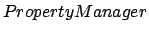 shows the properties,
which may be changed. The
is a property list
that is described by this interface:
shows the properties,
which may be changed. The
is a property list
that is described by this interface:

 is to add new
  objects to the list.
The property consists of a property name or a label and a value
editor. The value editor is for changing the value of the
property.
objects to the list.
The property consists of a property name or a label and a value
editor. The value editor is for changing the value of the
property.
The important component of the object is the
 . This is an object, which knows how to
retrieve the value of the property and how to store it after the
changes made by the editor. The custom value retrieval and
storage methods are implemented because in Java one cannot to
pass primitive objects by reference.
. This is an object, which knows how to
retrieve the value of the property and how to store it after the
changes made by the editor. The custom value retrieval and
storage methods are implemented because in Java one cannot to
pass primitive objects by reference.
A set of property providers is in the GMJ package, including:
 accesses the double array
elements
accesses the double array
elements
 uses the JDK1.1
Reflection classes providing access to any field of a class
uses the JDK1.1
Reflection classes providing access to any field of a class
The following sample code shows how to add a property called the
"Initial Speed" stored as the second element of the array
 . The initial speed can change in the range from 10
to 50 km/h. by this interface:
. The initial speed can change in the range from 10
to 50 km/h. by this interface:

Here is an example how to add a property named "Offset" stored
in a public variable  of the calling class

Adding a property to the property manager, an editor of the
appropriate type is created. If the user changes the value, the
value is automatically checked, validated and stored in the
second element of the array.
.
interface requiring many
functions to be overridden. Most of them are implemented in the
 class, which can be used as a base.
 of the class, which is
  :
:
 , instead of
writing custom providers.
,
and (see section 3.4).
The new tasks may need the new analysis objects. The new
analyzers may be derived from any base class. They can be
implemented as some windows, or they may log data to some
external files. The only requirement is to implement the
following
, instead of
writing custom providers.
,
and (see section 3.4).
The new tasks may need the new analysis objects. The new
analyzers may be derived from any base class. They can be
implemented as some windows, or they may log data to some
external files. The only requirement is to implement the
following
 interface:

 is called. It
asks the analysis objects to initialize. A
is called. It
asks the analysis objects to initialize. A
 object is passed as a parameter. It contains information to
initialize the analyzer.
object is passed as a parameter. It contains information to
initialize the analyzer.
The method  is called
when the analyzer is being deleted. It flush the open buffers or
close associated windows.
The data observer-notifier pattern is to deliver the results of
real time calculations to the analysis objects. The data
notifier has a list of data observers, which are notified when
new data is available. To receive these notifications, the
object implements the
is called
when the analyzer is being deleted. It flush the open buffers or
close associated windows.
The data observer-notifier pattern is to deliver the results of
real time calculations to the analysis objects. The data
notifier has a list of data observers, which are notified when
new data is available. To receive these notifications, the
object implements the
 interface and registers
on the appropriate
class. The registration
time is in the method:
before leaving.
interface and registers
on the appropriate
class. The registration
time is in the method:
before leaving.

The method  signals that new calculations are going
to be started.
signals that new calculations are going
to be started.
The method  signals, that a new
result has just been added to the .
signals, that a new
result has just been added to the .
The method
 signals that a method has made
progress and
did find the better point.
The method  signals
that the optimization is over.
signals
that the optimization is over.
The method  signals that the
  is depreciated and cannot be used
anymore. In such a case the observers should delete all the
references to the objects.
is depreciated and cannot be used
anymore. In such a case the observers should delete all the
references to the objects.

 button is pressed or the
applet is about to exit, then an
button is pressed or the
applet is about to exit, then an  flag is set for
the
flag is set for
the  thread. Therefore, and writers
are advised to test for
thread. Therefore, and writers
are advised to test for

 " is better as compared with "implement
." This makes a code more compatible with future GMJ
releases.
" is better as compared with "implement
." This makes a code more compatible with future GMJ
releases.
The original web-sites are attached to the servers 'optimum.mii.lt' or 'mockus.org'. Therefore, in some examples, the URL addresses should be updated to extract data from the local server .
On the 'Task' menu of GMJ1 global optimization software the examples are: "Portfolio," "Tvarka," and "Knapsack." In the task of school scheduling 'Tvarka.java', the URL address of the applet host is defined automatically and is shown on the graphical interface. In the task "Knapsack", some URL address is shown on the screen. It should be updated by users. In the "Portfolio" task, the URL is defined in the file 'Portfolio.java'. Therefore, recompiling is needed to extract the data.
If GMJ is loaded as a stand-alone application, one can accomplish these tasks without security restrictions. Loading GMJ as an applet one is running in a "sand-box." That means: no reading/writing files on client sites, no connections to strange hosts.
A way to guarantee that a signature is authentic is to notarize it by a Certificate Authority (CA). The Certificate Authority authenticates the identity of the applicant and then issues a signing certificate.
Anything signed with a signing certificate will bear the name of CA besides the signer name. The signature can be traced, by way of CA, to the signer.
"VeriSign,Inc." is the recognized CA. Signing certificates can be obtained
at:

For an
individual, it costs $40 per year for both Netscape and Internet
Explorer. The prices are expected to drop. Here is a fragment of
a signed applet:

The ARCHIVE parameter is parsed by Netscape. The CABBASE
parameter is parsed by Internet Explorer. Different browsers
use different signatures.
For example, the "Netscape" requires
to change some parts of Java software, besides signing  files.
Signing in "Sun Appletviewer" is simpler. The description is in the JDK documentation. Here a user needs the certificate and a "policy" file, where all his rights are listed.
To sign
"Internet Explorer" one downloads the Microsoft Java Developer
Kit. The additional information is in [Vitek and Jensen, 2000] and on web-sites:


Note, that one should not change the existing 'gmj20.jar' file in
GMJ2. Otherwise, security restrictions might be violated.
Therefore, extending GMJ a user creates his own
files.
In such cases the output is implemented as an analysis object
(see section 4.4). However, we need many analysis objects to satisfy all the tasks.
To show only task-specific analysis objects, in GMJ2 the
class implements the  interface

The  function returns a class list of custom
analyzers of the task.
function returns a class list of custom
analyzers of the task.
 are included using
penalty functions. This is not always convenient.
are included using
penalty functions. This is not always convenient.
In GMJ2 the class
is extended to represent any
non-rectangular domain.
This domain includes the function.

This function defines a constraint value at the point  . It
returns number 1 by default (see Figure 9.6).
Writing new methods in GMJ2, one checks the constraint function before calling the objective function of the . If a
method does not support constraints, one multiplies the constraint value by and minimizes the result.
. It
returns number 1 by default (see Figure 9.6).
Writing new methods in GMJ2, one checks the constraint function before calling the objective function of the . If a
method does not support constraints, one multiplies the constraint value by and minimizes the result.
Implementing a task in GMJ2, the custom domain class can be
derived from the
 class. This enables a
user to specify the constraint function at run time.
adds an entry field in the task
configuration panel. In this panel, any algebraic expression can
be entered and compiled at run time (see Figure 9.6).
class. This enables a
user to specify the constraint function at run time.
adds an entry field in the task
configuration panel. In this panel, any algebraic expression can
be entered and compiled at run time (see Figure 9.6).
 meaning that
 .
Using these tools,
GMJ2 users can specify any constraint function.
.
Using these tools,
GMJ2 users can specify any constraint function.
Using GMJ2 in the videoconferencing, one needs Multiple Monitor Support. One can render on multiple screens by creating
 ,
,  ,
,  , or
, or  objects with the
 of the target
 .
.
The new Frame constructor,
 , enables creation of a
Frame object on a different screen device.
, enables creation of a
Frame object on a different screen device.
The new Window constructor,
 , constructs a new invisible
window with the specified window as its owner and
the
of a screen device.
, constructs a new invisible
window with the specified window as its owner and
the
of a screen device.
The new
 method
returns the bounds of the
in
device coordinates. If you have a virtual device,
then the device coordinates returned from
method
returns the bounds of the
in
device coordinates. If you have a virtual device,
then the device coordinates returned from  are virtual device coordinates.
Finally, the new Component
 method returns the
with which
the
method returns the
with which
the  was created.
In a virtual device configuration consisting of
more than one physical screen device, the
objects' coordinates are
relative to the virtual coordinate system. For this
reason, virtual coordinates must be used when
calling the  method of a or
. Similarly, calling of a
in a virtual device
environment returns virtual device coordinates.
method of a or
. Similarly, calling of a
in a virtual device
environment returns virtual device coordinates.
The following code sample creates a object
for each
on each screen
device in the
 . It offsets the
coordinates of the intended location of the
with the bounds of the
to
ensure that the appears on the screen of the
specified
.
. It offsets the
coordinates of the intended location of the
with the bounds of the
to
ensure that the appears on the screen of the
specified
.

If the bounds of a
is not
taken into account in this sample, a would
appear at location  on the primary
screen, which might be different than the screen of
the specified
.
on the primary
screen, which might be different than the screen of
the specified
.
For more information on how the Java 2D API supports multi-screen environments, see Rendering in a Multi-Screen Environment in the Programmer's Guide to the Java 2D API.
This applies to other examples using Java1.2.
The  function is included into the
  page of of GMJ2 (see Figure
9.6). In this Figure the
page of of GMJ2 (see Figure
9.6). In this Figure the  task is active. There are several different tasks:
  ,
,  ,
,  ,
,  and four types of sine and cosine.
is sine with a non-linear constraint.
and four types of sine and cosine.
is sine with a non-linear constraint.  is sine with a linear constraint.
  is sine without constraints and
  is cosine without constraints. The task is for the school scheduling [Nemajunas and Remeikis, 1999]. is for the Walras problem and is for the Duel problem.
The  menu of GMJ2 is in Figure 9.7.
 , ,,
, ,, , and
, and  and three local methods
  ,
,  , and
, and  . The method is the Java version [Margelevicius, 1999]
of the non-linear programming method by Schittkowski
[Schittkowski, 1985]. Names of remaining methods are the same as in GMJ1.
. The method is the Java version [Margelevicius, 1999]
of the non-linear programming method by Schittkowski
[Schittkowski, 1985]. Names of remaining methods are the same as in GMJ1.
The  menu of GMJ2 is in Figure 9.8.
, , and are common for all tasks. Four analysis objects: ,  and
and  are task-specific.
shows the initial and the optimized school schedules. shows how the server profit depends on prices and other parameters. The task-specific analysis objects
should be seen, if corresponding tasks are on. Otherwise,
they should be closed. The analysis object
satisfies this condition.
is the graphical interface of the duel problem. One see it, if the task is on.
Figure 9.9 shows this.
are task-specific.
shows the initial and the optimized school schedules. shows how the server profit depends on prices and other parameters. The task-specific analysis objects
should be seen, if corresponding tasks are on. Otherwise,
they should be closed. The analysis object
satisfies this condition.
is the graphical interface of the duel problem. One see it, if the task is on.
Figure 9.9 shows this.
In the 'Spectrum' window
there is an
additional option.
The window shows how depends the distribution of values on
each variable  (see Figure 9.11).
jonas mockus 2004-03-03


