Subsections
6 C++ Version (GMC)
The Global Minimizer's C++ version GMC is for continuous
global optimization [Mockus et al., 1997].
Users define their optimization problems
describing
- parameters that can be changed (defined as variables
 ),
),
- function of those variables (defined as
objective function
 ),
),
- constraints restricting a possible
change of variables (defined as inequalities
 , or equalities
 ).
).
Formally
The objective function may be deterministic or (for some
methods) with "noise." As usual, the optimization region is
defined by rectangular constraints (4.2). For some
methods, Nlp and Flexi, this region is defined by linear and
non-linear constraints (6.3) and (6.4).
2 User's Reference
1 Requirements
- C++ compiler, for example, GNU g++ compiler or
any ANSI C++ compliant compiler,
- X-Window
system,
- UNIX (Linux, Solaris, AIX),
- experience in writing simple C, or C++
functions.
2 Installation
Differences between various UNIX versions are reflected in the
file 'Makefile'. An example for individual Linux users is in
Figure 6.1. An AIX version for individual users is
in [Mockus et al., 1997]. A
classroom (collective user) version for Solaris is there, too.
Figure 6.1:
Example of 'Makefile' for Linux.
 |
Using some other UNIX version, the Makefile has to be changed
accordingly.
Installing GMC one should
- copy the archive file
 from the web-site (see section 4) by the unix command

- extract GM files from the archive 'gmc.tgz' by the command

3 Initialization
- Define the objective as some function
 .
The function has two parameters: an array of values of
each variable and the number of variables. The function
returns the value of objective, given the values of variables.
.
The function has two parameters: an array of values of
each variable and the number of variables. The function
returns the value of objective, given the values of variables.
- Define "non-interactive" linear or non-linear constraints
as a function named
 It has four parameters: an array
of values of variables, the number of variables, an array of
values of constraints, and the number of constraints. Values of
constraints are returned by the function .
It has four parameters: an array
of values of variables, the number of variables, an array of
values of constraints, and the number of constraints. Values of
constraints are returned by the function .
A user can
also define rectangular constraints interactively, during the
optimization
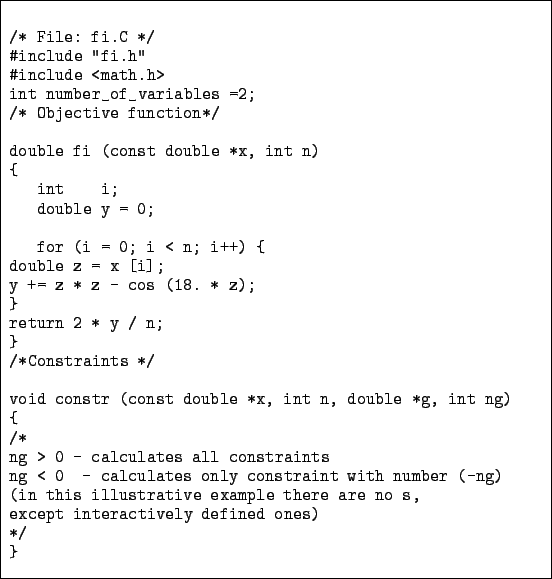
- Describe objectives and constraints in a
file named
 (see Figure 6.2)
- the objective function is implemented by the routine

- the constraints are defined by the routine

- Start optimize the problem described in the file
.
- set X-window
- compile

- run

Figure 6.2:
Example of the file 'fi.C.'
 |
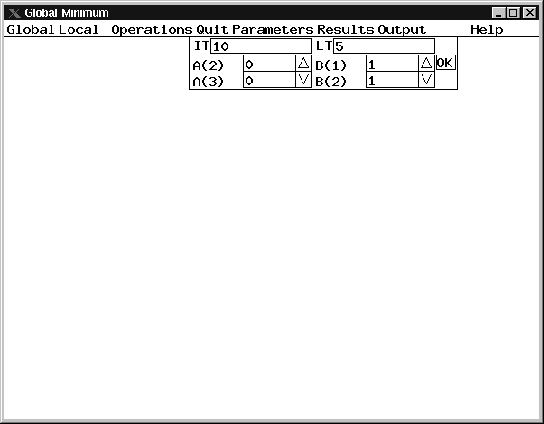
The opening menu of GMC is in Figure 6.3
Figure 6.3:
An example of GMC opening menu and parameter box.
 |
- The Main Menu:
Global, Local, Operations, Quit,
Parameters, Results, Output.
- Global Optimization Menu:
Bayes1, Mig1, Unt, Exkor, Glopt, Lpmin.
- Local Optimization
Menu:
Nlp, Flexi, Lbayes.
By default the initial point for
local optimization is the result of previous global optimization.
- Operations Menu:
Run, Stop, Exit.
- Quit Command.
- Parameter Box.
Enter the parameters of methods and point
O.K.
An example of the parameter box is in Figure
6.3.
- Results Box:
Shows the best
objective Y and the best variables X(I). If no changes are needed, point O.K.
- Output Menu:
- Convergence, Projection, and Numeric Windows.
- Convergence window shows how the objective depends on the
iteration number (see the Figure 6.4.
Figure 6.4:
Convergence window.
 |
- Projection windows show how the objective depends on the
different variables. One defines the projection by entering the
number of variable. Figures 6.5 and 6.6
show two projections.
Figure 6.5:
Projection 1 (shows how depends on the first
variable).
 |
Figure 6.6:
Projection 2 (shows how depends on the second variable).
 |
- Numeric window shows the current values of objective and
variables (see Figure 6.7).
Figure 6.7:
Current numeric results.
 |
- Using Menu:
- To see "invisible" components of a vector, point to
'down' or 'up' arrows. The vector scrolls, if there are
invisible components.
- To edit a variable, touch
BACKSPACE
![[*]](footnote.png) , then edit the
variable and point to O.K.
, then edit the
variable and point to O.K.
- Enter the Parameter Box
immediately after selecting a method.
jonas mockus
2004-03-03


